The AI Crawler Map: Which AI Bots to Allow, Which to Block, and the Settings That Decide It
Author: Justin Davis, Link Builders
Every major AI crawler from OpenAI, Anthropic, Perplexity and Google, plus the Cloudflare and Bing settings that affect them.
Every major AI company sends out separate bots for separate jobs. Some collect pages to train future models, some build the search index that AI answers cite, and some visit a page only because a person asked about it. If you want to keep your content out of AI training but still get cited in ChatGPT, Claude, Perplexity and Google’s AI features, block the training bots and allow the search bots. Then check your firewall, because a lot of AI blocking happens outside robots.txt.
Most sites that try to control AI get this wrong in one of two ways. Some block the very bots that would have cited them, and never find out why AI tools ignore them. Others think they’ve opted out of Google’s AI Overviews, when the setting they changed doesn’t do that at all.
This guide is the full map. It covers every major AI crawler, what each one does, three robots.txt templates you can copy, the network settings that quietly override all of it, and the content problems that keep AI from reading your pages even when the door is open. It’s the written version of my video The AI Crawler Map, so you can watch it or read it.
The Three Jobs an AI Bot Can Do
Before you look at any bot names, it helps to understand that every AI company sends bots out for three different jobs.
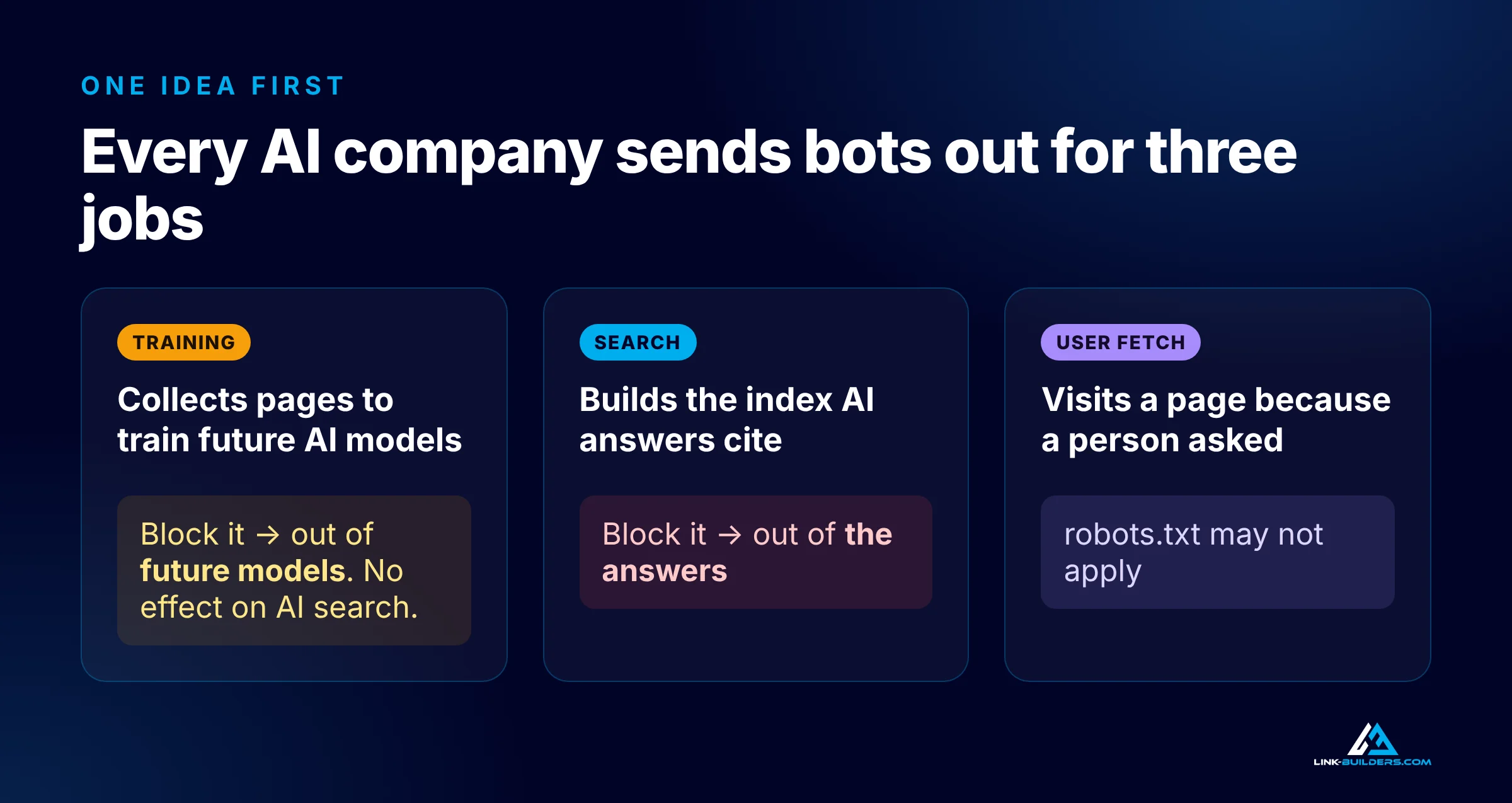
Blocking a training bot and blocking a search bot are very different decisions.
Training. These bots collect pages to train future AI models. Blocking them keeps your content out of future models. It does not remove you from AI search results.
Search. These bots build the index that AI answers pull from when they cite sources. Blocking them keeps you out of the answers.
User fetch. These bots visit a page because a person asked. Someone pastes your link into a chat, or asks the AI to check your site, and the assistant fetches the page on their behalf. Several of these bots don’t follow robots.txt, because the visit was requested by a human.
Those are very different decisions, and most sites make all of them at once without knowing it. A single Disallow: / under a wildcard user agent, or a “block AI” toggle in a security tool, can cut you off from training and search together.
The AI Crawler Map, Company by Company
Here’s every major bot in one table, followed by the details for each company.
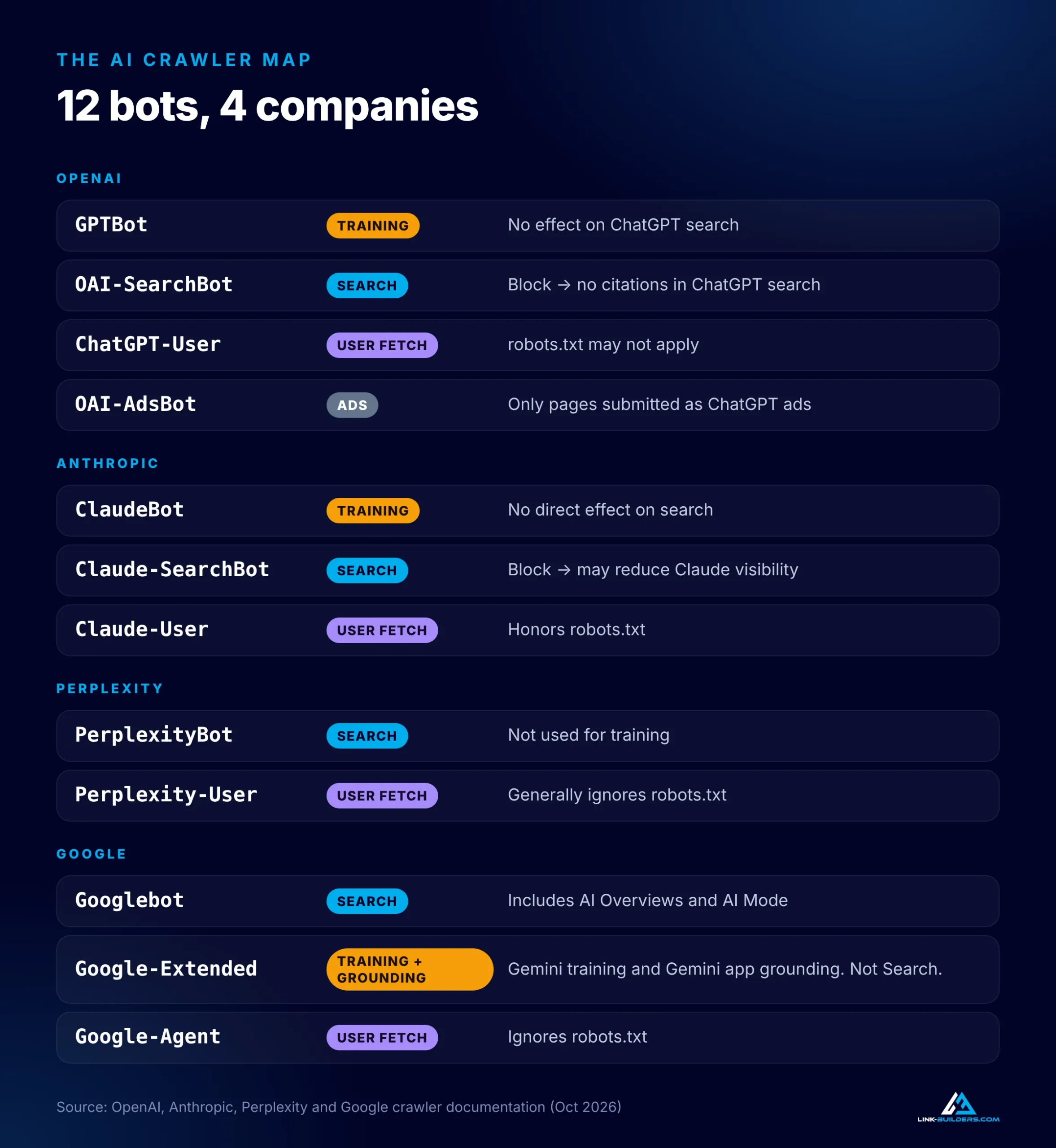
The full crawler map at a glance. Search bots are the ones that decide whether you get cited.
| Company | Bot | Job | What blocking it does |
|---|---|---|---|
| OpenAI | GPTBot | Training | Keeps your content out of model training. No effect on ChatGPT search. |
| OpenAI | OAI-SearchBot | Search | Your pages stop being cited in ChatGPT search answers. |
| OpenAI | ChatGPT-User | User fetch | robots.txt rules may not apply. |
| OpenAI | OAI-AdsBot | Ads | Only visits pages submitted as ChatGPT ads. |
| Anthropic | ClaudeBot | Training | No direct effect on search visibility. |
| Anthropic | Claude-SearchBot | Search | May reduce your visibility in Claude’s search results. |
| Anthropic | Claude-User | User fetch | Honors robots.txt, so Claude can’t read your page even when asked. |
| Perplexity | PerplexityBot | Search | Removes you from Perplexity’s search results. Not used for training. |
| Perplexity | Perplexity-User | User fetch | Generally ignores robots.txt. |
| Googlebot | Search | Removes you from Google Search, including AI Overviews and AI Mode. | |
| Google-Extended | Training and grounding | Opts out of Gemini training and grounding in the Gemini app. Does not affect Google Search. | |
| Google-Agent | User fetch and agents | Ignores robots.txt. |
OpenAI (ChatGPT)
OpenAI runs four bots, documented on its crawler overview page.
GPTBot is the training crawler. Disallowing it tells OpenAI not to use your content for training its models, and OpenAI states this does not affect whether your site appears in ChatGPT search.
OAI-SearchBot is the one that matters for visibility. If you block it, your pages won’t appear in ChatGPT search answers. They might still show up as a plain navigation link, but they won’t be cited as a source.
ChatGPT-User handles actions a user starts, like visiting a page they asked about. OpenAI’s documentation says that because these visits are user-initiated, “robots.txt rules may not apply.”
OAI-AdsBot is the newest. It only visits pages that someone has submitted as an ad in ChatGPT, to check them for safety and relevance.
One more detail from OpenAI’s publishers and developers FAQ catches people off guard. ChatGPT can still show a link and title for a page you’ve blocked if it finds the URL somewhere else, such as through a third-party search provider. If you truly want a page gone, use a noindex meta tag, and let OAI-SearchBot crawl the page so it can read that tag. The same FAQ notes that ChatGPT adds utm_source=chatgpt.com to referral links, so you can track that traffic in your analytics.
Anthropic (Claude)
Anthropic runs three bots, described in its help center article on how Anthropic crawls the web.
ClaudeBot collects content for model training. Anthropic says disabling it has no direct effect on search visibility.
Claude-SearchBot improves the relevance and accuracy of Claude’s search results. Anthropic warns that blocking it may reduce your site’s visibility in those results.
Claude-User fetches pages when someone asks Claude a question. Unlike most user bots, Anthropic says this one honors robots.txt. So if you block it, Claude can’t read your page even when a customer asks about your company by name.
Three more details from Anthropic’s documentation are worth knowing:
- Crawl-delay works. Anthropic supports the
Crawl-delaydirective, so you can slow its bots down instead of blocking them. - Don’t block by IP address. If you block its IP ranges, the bots can’t even read your robots.txt file to see your rules.
- Rules apply per subdomain. If you run a blog, shop or language version on a subdomain, each one needs its own robots.txt file.
Perplexity
Perplexity keeps it simple, with two bots in its crawler documentation.
PerplexityBot builds Perplexity’s search results, and Perplexity says it is not used to train AI models. Since it only affects whether you can be cited, there’s very little reason to block it.
Perplexity-User fetches pages when a person asks a question. Perplexity says it generally ignores robots.txt, because a user requested the visit.
Google is where most of the confusion lives, because its AI features don’t run on a separate bot.
Googlebot powers Google Search, and that includes AI Overviews and AI Mode. There is no separate AI Overviews crawler. If Googlebot can crawl and index your page, it can appear in Google’s AI features.
Google-Extended isn’t a bot at all. It’s a product token that Google reads in your robots.txt file. According to Google’s common crawlers documentation, it controls whether content Google crawls may be used for training future Gemini models, and for grounding in the Gemini app and in Google’s Vertex AI products. Google states that Google-Extended “does not impact a site’s inclusion in Google Search” and is not a ranking signal.
Notice that the definition covers more than training. If you block Google-Extended, you may also keep your pages out of live, grounded answers in the Gemini app. And because Google-Extended has no user agent string of its own, you’ll never see it in your server logs. Crawling still happens through Google’s regular crawlers.
Google-Agent is newer. Google’s page on user-triggered fetchers says it’s used by agents hosted on Google’s systems to browse the web and take actions a user asked for. Like Google’s other user-triggered fetchers, it generally ignores robots.txt.
robots.txt Is a Request, Not a Lock
Here’s the big lesson so far. The training and search bots from these companies say they follow robots.txt. But several of the user bots don’t, by design: ChatGPT-User, Perplexity-User and Google-Agent all treat a person’s request as permission to visit.
If you need a real block, it has to happen at your firewall or server, not in robots.txt.
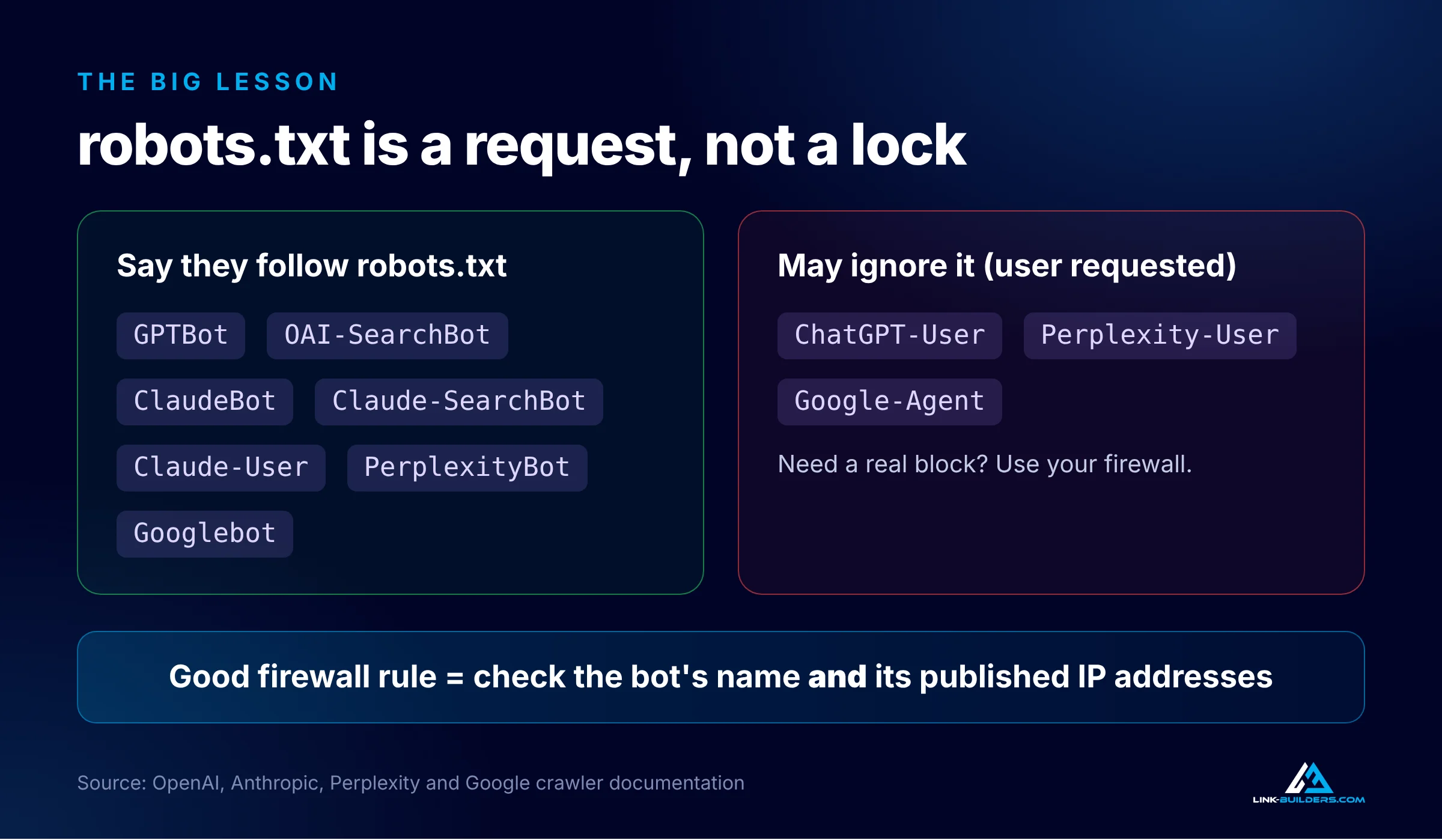
Several user-triggered bots treat a person’s request as permission to visit.
There’s a catch there too. Anyone can pretend to be a well-known bot by copying its name into a request. That’s why the AI companies publish the IP addresses their bots use:
- OpenAI:
openai.com/searchbot.json,openai.com/gptbot.jsonandopenai.com/chatgpt-user.json - Perplexity:
perplexity.com/perplexitybot.jsonandperplexity.com/perplexity-user.json - Google:
user-triggered-agents.jsonfor Google-Agent, plus reverse DNS verification for its other crawlers
A good firewall rule checks both the bot’s name and its IP address. That protects you from fake bots without locking out the real ones.
Three robots.txt Templates You Can Copy
Pick the template that matches your goals. Replace the sitemap URL with your own.
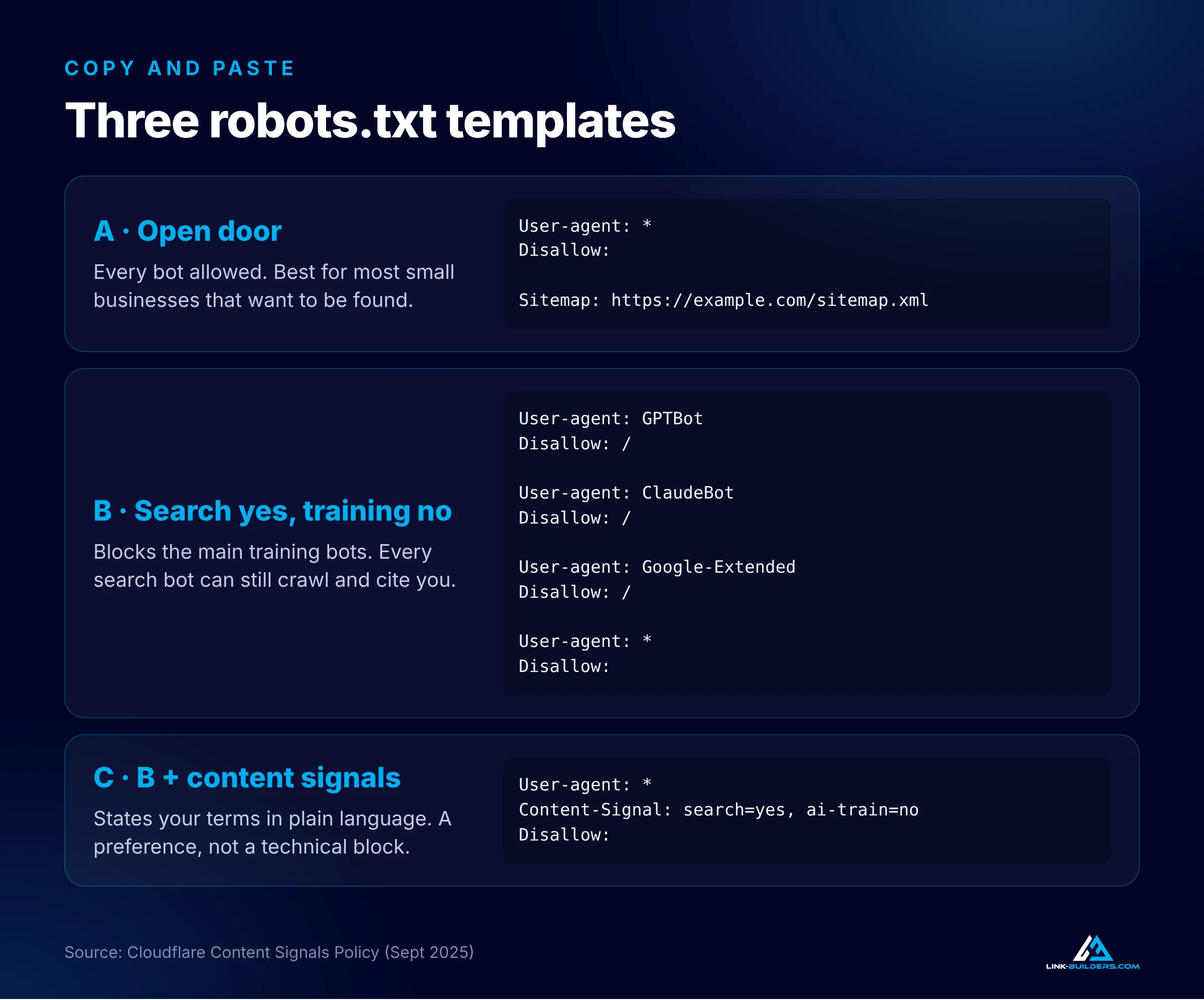
The three templates side by side. The full text of each is below.
Template A: Open Door
Every bot is allowed.
User-agent: *
Disallow:

Sitemap: https://example.com/sitemap.xml
For a small business that wants to be found, this is usually the right call. Some AI tools answer from what they learned in training rather than from a live search. One analysis of AI grounding rates found Gemini searched the web for only about 41% of its answers, while ChatGPT, AI Mode, Copilot and Perplexity searched for more than 90%. When an assistant answers from memory, being part of its training data is the only way your brand can come up.
Template B: Search Yes, Training No
This blocks the main training bots and leaves every search bot open.
User-agent: GPTBot
Disallow: /

User-agent: ClaudeBot
Disallow: /

User-agent: Google-Extended
Disallow: /

User-agent: *
Disallow:

Sitemap: https://example.com/sitemap.xml
This template fits publishers who don’t want their work used to train models but still want citations. Remember that blocking Google-Extended may also keep you out of grounded answers in the Gemini app. It won’t affect Google Search, AI Overviews or AI Mode.
Template C: Template B Plus Content Signals
In September 2025, Cloudflare introduced its Content Signals Policy, a way to state your terms in robots.txt in plain language. Add a content signal line to Template B:
User-agent: *
Content-Signal: search=yes, ai-train=no
Disallow:
The signal says search engines may index your pages, and your content may not be used for AI training. Cloudflare also defines a third signal, ai-input, for content fed into AI answers in real time. Cloudflare is clear that these are stated preferences, not technical blocks. They put your terms on the record, but enforcement still depends on the bot’s owner or your firewall.
The Blocking That Happens Outside robots.txt
A lot of AI blocking doesn’t happen in robots.txt at all. It happens at your network, your host or your security plugin, often without anyone on the marketing team knowing.
Cloudflare, which sits in front of a large share of the web, is the most common example:
- July 1, 2025: Cloudflare began blocking AI crawlers by default on new domains unless the owner chose otherwise.
- September 24, 2025: Cloudflare began adding content signals to the robots.txt files it manages for customers. More than 3.8 million domains were using managed robots.txt at the time.
- September 15, 2026: New domains got updated defaults. According to Cloudflare’s Block AI bots documentation, bots classified as training or agent bots are blocked on pages that display ads, while search bots stay allowed.
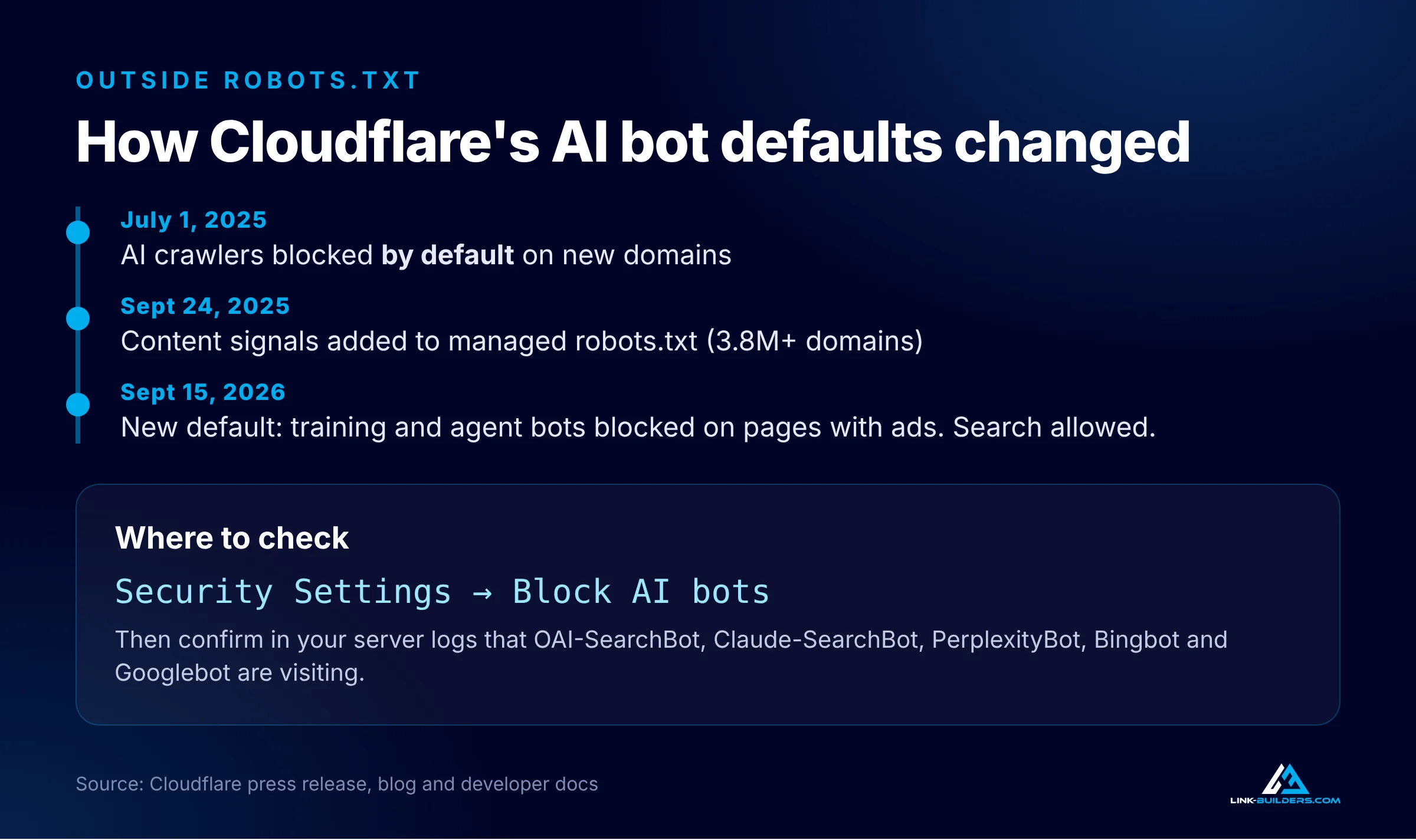
Cloudflare has changed its AI bot defaults three times since mid-2025.
If you use Cloudflare, open your dashboard, go to Security Settings, find Block AI bots, and make sure it matches what you actually want. And don’t stop at Cloudflare. Hosting companies and WordPress security plugins run their own firewalls and bot rules too.
Check Your Server Logs
The final proof for any site is in the server logs. Ask your host for the access logs, then search them for the names of the search bots: OAI-SearchBot, Claude-SearchBot, PerplexityBot, Bingbot and Googlebot. If you never see them, something is stopping them, even if your robots.txt file looks perfect.
What Actually Removes a Page From AI Overviews and AI Mode
This is the biggest Google myth, so it’s worth being precise. In its documentation on AI features and your website, Google lists three requirements for a page to appear as a source in AI Overviews or AI Mode:
- The page is indexed.
- The page is eligible to be shown with a snippet in regular search.
- The page meets Google Search’s technical requirements.
There’s no special AI markup and no special file. Google’s newer guide on optimizing for generative AI features repeats the point: SEO best practices are the foundation, and things like llms.txt files aren’t used by Google Search.
So what takes a page out of AI Overviews and AI Mode? Only the controls that already exist for regular search:
- A
nosnippetrobots meta tag - A
data-nosnippetattribute on part of a page - A
max-snippetlimit - A
noindextag - Blocking Googlebot in robots.txt
Google-Extended is not on that list.
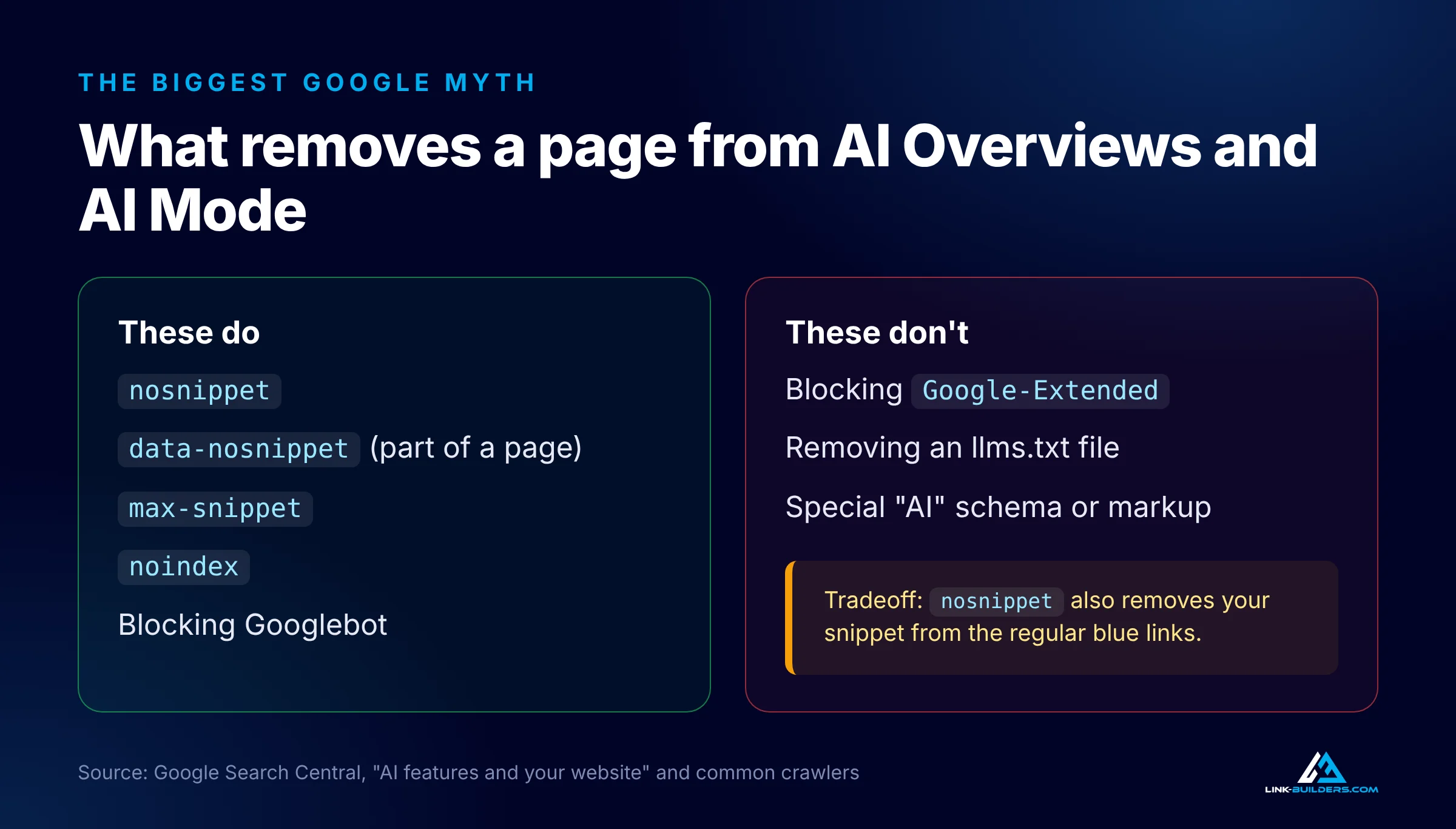
Only Google’s normal snippet and indexing controls affect AI Overviews and AI Mode.
There’s a tradeoff to understand before you use any of these. A nosnippet tag also removes your text snippet from the regular blue link results. For most businesses, that costs more clicks than it saves. If you’re trying to measure how AI features affect your traffic before you change anything, I walk through the reports in how to read Search Console and GA4 data for SEO.
Content AI Crawlers Can’t See
Getting a bot through the door is half the job. It also has to be able to read what’s on the page.
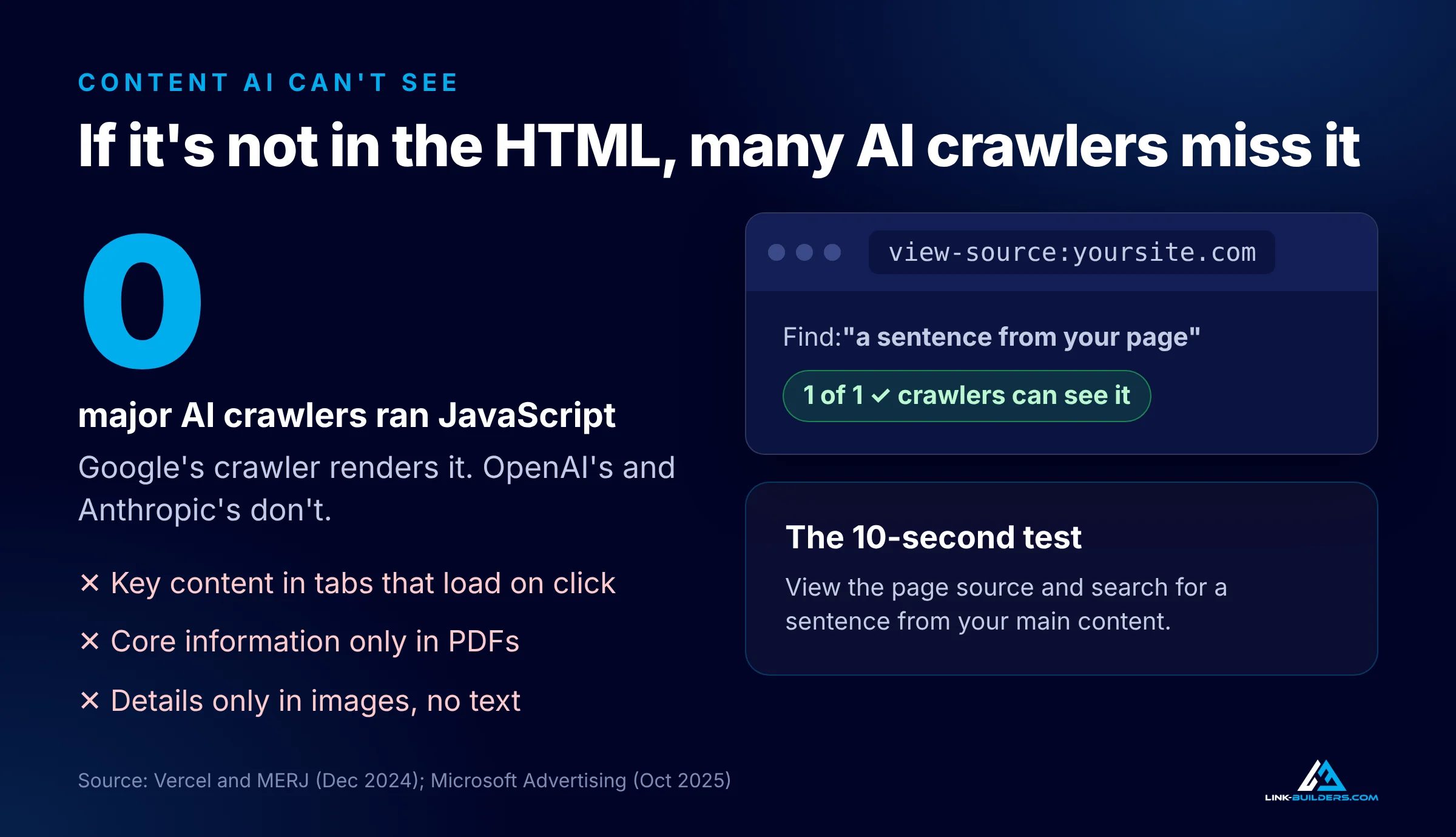
If your main content isn’t in the HTML your server sends, many AI crawlers miss it.
JavaScript. A study of AI crawler traffic on Vercel’s network, The Rise of the AI Crawler, found that none of the major AI crawlers ran JavaScript. OpenAI’s and Anthropic’s crawlers downloaded JavaScript files but didn’t execute them. Google’s crawler, which renders pages, was the exception. So if your text only appears after scripts load, as it does on many modern web apps, many AI tools see a nearly empty page. The fix is to make sure your main content is in the HTML your server sends. Developers call this server-side rendering.
Hidden and non-text content. Microsoft’s guidance on optimizing content for AI search answers lists three things to avoid:
- Key content hidden in tabs or accordions that may not render
- Core information available only in PDF files
- Important details only inside images, with no text alternative
Accordions aren’t automatically a problem. An accordion is fine if the text is already in the page’s HTML and the accordion just collapses it. It’s a problem if the text only loads when someone clicks.
The 10-second test. Open your page, view the page source in your browser, and search for a sentence from your main content. If it’s there, crawlers that read raw HTML can see it. If it isn’t, many AI crawlers can’t either. Once they can read it, clear sections decide which passage gets used, as I explain in chunking content for AI search.
Make Your Site Usable for AI Agents
AI agents don’t just read websites. They use them. They fill in forms, compare options and book things on a person’s behalf. Google’s web.dev guide to building agent-friendly websites says these agents understand a site in three ways: screenshots of the rendered page, the page’s HTML structure, and the accessibility tree, which is the same simplified map that screen readers use.
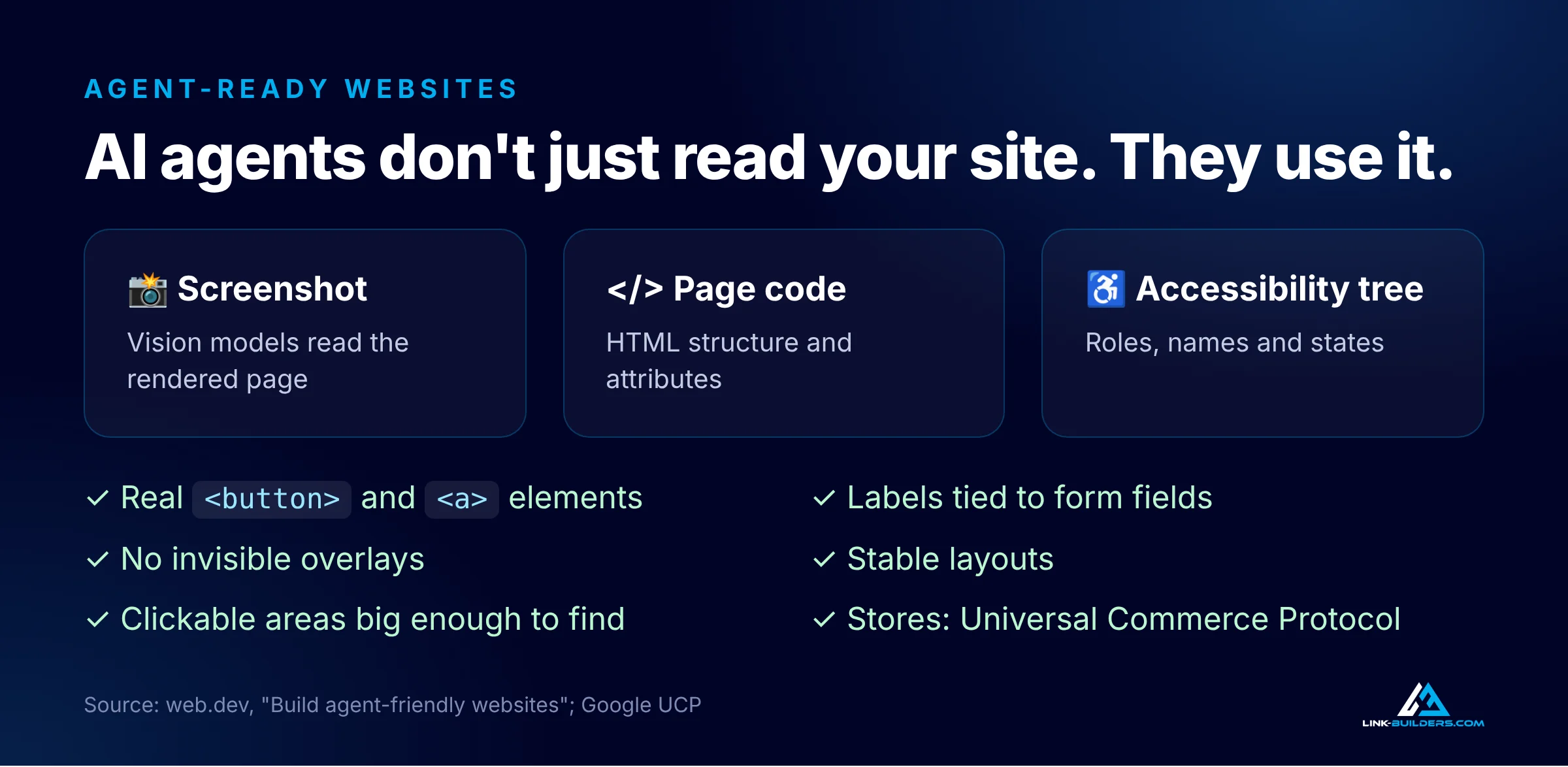
Agent-ready sites follow the same rules as accessible ones.
That means the advice is close to good accessibility practice:
- Use real buttons and links. Use
<button>and<a>elements, not<div>or<span>elements styled to look like buttons. - Connect labels to form fields. Use the
forattribute on each<label>so an agent knows what every field is for. - Avoid invisible overlays. Transparent layers on top of buttons can cause an agent to skip the button underneath.
- Keep layouts stable. If the add to cart button is in a different spot on every product page, agents that work from screenshots get confused.
- Make clickable areas big enough to find. Tiny targets can get filtered out.
The Universal Commerce Protocol
If you sell products online, there’s also a new standard to know about. Google introduced the Universal Commerce Protocol in January 2026, developed with Shopify, Etsy, Wayfair, Target and Walmart. It lets AI agents complete checkout on a store’s behalf inside AI Mode and the Gemini app. For now it’s available to eligible stores in the United States and runs through Google Merchant Center, product structured data and a manifest file at /.well-known/ucp. Semrush has a clear overview of the Universal Commerce Protocol with the setup details.
For service businesses, the step to take now is simpler. Make sure an agent could fill in your contact or booking form without guessing what each field means.
Don’t Ignore Bing
Microsoft Copilot and Bing’s own AI summaries are built on Bing’s index. When Ahrefs compared AI assistant citations to search results across 15,000 queries, Copilot’s citations lined up with Bing’s top 10 more than any other assistant’s did, at 16.6%, followed by Perplexity at 14%. OpenAI also says ChatGPT can find pages through third-party search providers, though it doesn’t name them. Being indexed in Bing isn’t optional anymore.
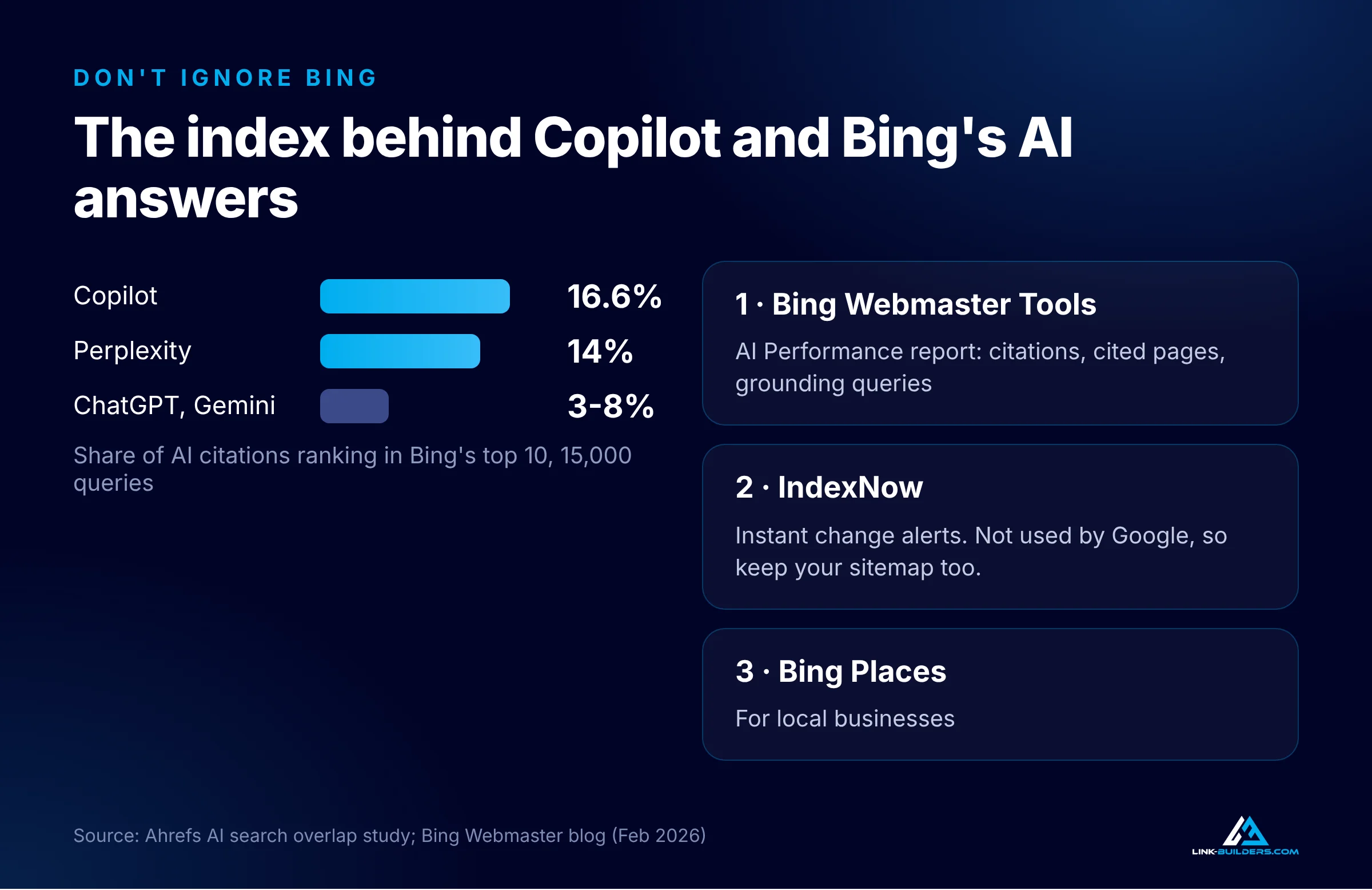
Bing’s index sits behind Copilot and Bing’s AI answers.
Three steps cover most of it:
- Verify your site in Bing Webmaster Tools. Since February 2026, it includes an AI Performance report that shows how often your pages are cited in Copilot and Bing’s AI summaries, which pages were cited, and the grounding queries the AI ran to find them.
- Set up IndexNow. IndexNow is a free way to tell Bing and other participating search engines, including Yandex, Naver, Seznam and Yep, the moment a page changes. Google doesn’t use it, so keep your XML sitemap current too.
- Claim your Bing Places listing if you serve a local area. Microsoft says it helps keep your business details eligible for AI-generated answers.
What I Found When I Checked My Own Site
I ran every check in this guide on my own tour company’s website, Medellin Tours, so I could show what a real audit looks like.
The robots.txt file on the main domain and on the Spanish subdomain was fully open to every bot. The site is hosted on GoDaddy with no Cloudflare in front of it, so Cloudflare’s default blocking didn’t apply. The home page has an FAQ accordion, which is the kind of element Microsoft warns about, but the answers are in the page’s HTML even while collapsed. Tour prices, durations and meeting details are plain text, not images. And the robots meta tag allows full snippets.
Then I asked ChatGPT seven questions a tourist might ask about tours in Medellín. It didn’t recommend Medellin Tours once.
The door was open. AI just didn’t have enough reasons to walk through it. That’s the point of this whole guide. Access is the price of entry, and plenty of sites fail it without knowing. But once AI can reach and read your pages, what gets you cited is what other trusted sites say about you: mentions, reviews and links. I’ve written more about that side in how to get cited by AI and building backlinks in an age of AI. If you’d rather hand the whole thing off, that’s the work I do as a GEO agency built on off-site authority.
The 15-Minute AI Access Checklist
Run through this list on your own site:
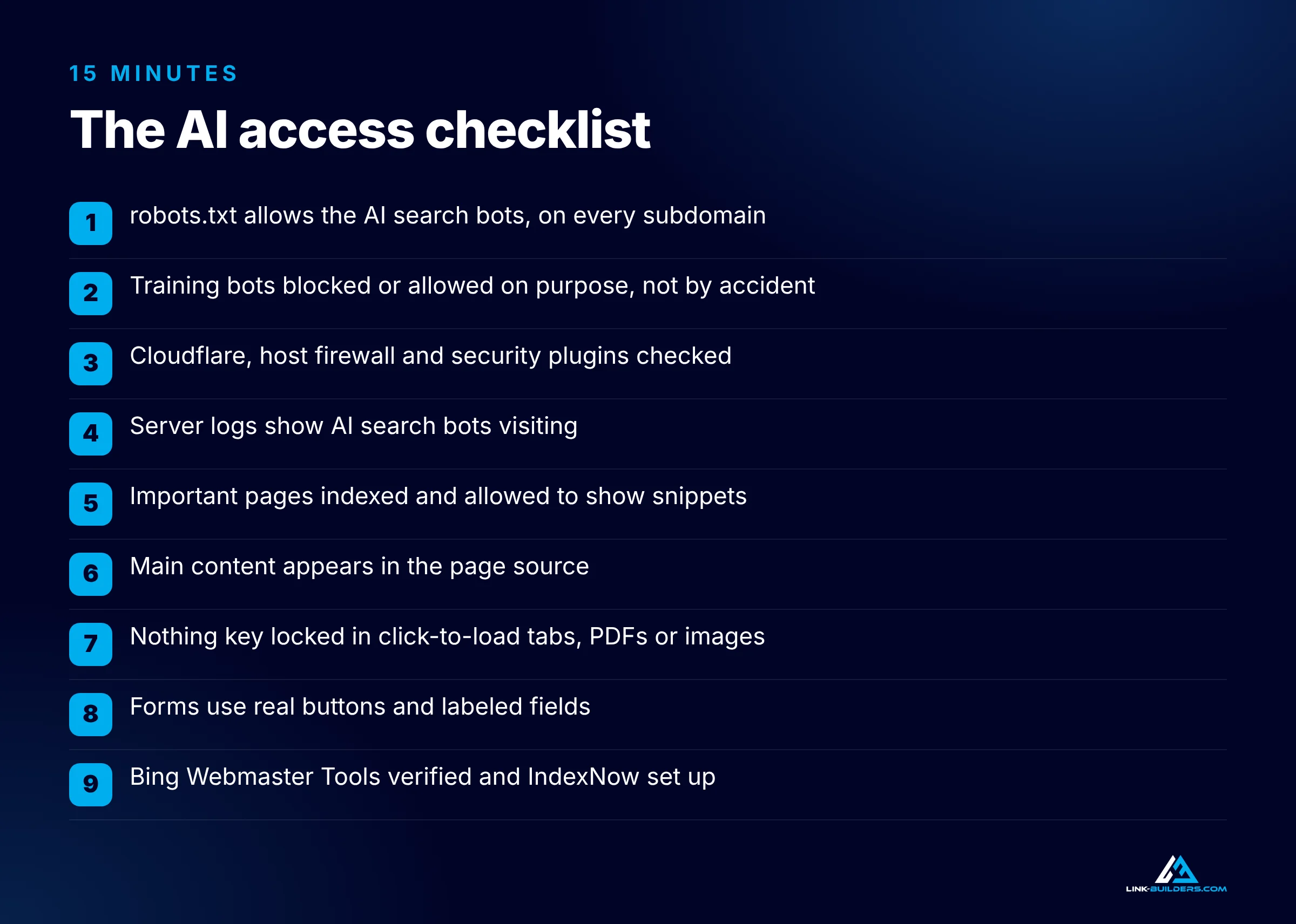
Save this checklist and run it on every site you manage.
- robots.txt: Are OAI-SearchBot, Claude-SearchBot, Claude-User, PerplexityBot and Googlebot allowed? Check every subdomain.
- Training choices: Have you made a deliberate decision about GPTBot, ClaudeBot and Google-Extended, rather than an accidental one?
- Firewall and network: Check Cloudflare’s Block AI bots setting, your host’s firewall and any security plugins.
- Server logs: Do you see AI search bots visiting? If not, find out why.
- Snippets: Are your important pages indexed and allowed to show snippets in Google?
- Content in the HTML: Does a sentence from your main content appear in the page source?
- Hidden content: Is anything important locked in click-to-load tabs, PDFs or images without text?
- Agent-ready forms: Are your forms built with real buttons and labeled fields?
- Bing: Is your site verified in Bing Webmaster Tools, with IndexNow set up?
If any answer is no, fix that before you spend more on content or links.
Frequently Asked Questions
Does blocking GPTBot remove my site from ChatGPT search?
No. GPTBot is OpenAI’s training crawler. OpenAI states that disallowing it does not affect whether your site appears in ChatGPT search. The bot that controls ChatGPT search is OAI-SearchBot. Block that one and your pages stop being cited in ChatGPT search answers.
Does blocking Google-Extended remove my site from AI Overviews?
No. Google states that Google-Extended does not affect inclusion in Google Search, which includes AI Overviews and AI Mode. Google-Extended controls Gemini model training and grounding in the Gemini app and Vertex AI. To keep a page out of AI Overviews, you’d need nosnippet, max-snippet, noindex or a Googlebot block.
Do AI crawlers follow robots.txt?
Most training and search bots from OpenAI, Anthropic, Perplexity and Google say they follow robots.txt. Several user-triggered bots don’t, including ChatGPT-User, Perplexity-User and Google-Agent, because a person requested the visit. Anthropic says its Claude-User bot does honor robots.txt. To enforce a block, use a firewall rule that checks both the user agent and the published IP addresses.
Should a small business block AI training bots?
It depends on your goals, but most small businesses that want to be found benefit from allowing them. Some AI tools answer from training data instead of a live search, and in those cases being part of the training data is the only way your brand can be mentioned. Publishers who sell their content often choose to block training and allow search.
Do AI crawlers render JavaScript?
The major AI crawlers from OpenAI and Anthropic do not, according to a large study of AI crawler traffic. Google’s crawler does render JavaScript. Keep your main content in the HTML your server sends so every crawler can read it.
Does llms.txt help AI crawlers?
Google says Google Search doesn’t use llms.txt files, and they neither help nor hurt visibility there. There’s no public evidence that other major AI search engines use them to decide what to cite. Your robots.txt file, firewall settings and server-rendered content matter far more.
Key Takeaways
- AI bots do three jobs: training, search and user fetch. Blocking a training bot and blocking a search bot are very different decisions.
- To block training but keep AI citations, block GPTBot, ClaudeBot and Google-Extended, and allow OAI-SearchBot, Claude-SearchBot, Claude-User, PerplexityBot and Googlebot.
- Google-Extended doesn’t remove you from AI Overviews or AI Mode. Only
nosnippet,data-nosnippet,max-snippet,noindexor a Googlebot block does that. - robots.txt is a request, not a lock. Several user bots ignore it, and real blocks happen at the firewall.
- Cloudflare and other security tools can block AI bots by default. Check them, then confirm in your server logs.
- Keep your main content in the HTML, build forms agents can use, and get your site set up in Bing.
Access Is the Price of Entry
Once AI can reach and read your site, the question becomes whether it has a reason to cite you. That comes from the rest of the web: the review sites, resource pages, industry articles and comparison posts that AI engines pull from when they build an answer. I’ve built backlinks since 2015, and earning placements on those pages is what Link Builders does every day, with full transparency on every opportunity, contact and cost.
Want to see which sites could be talking about your brand? Request a free sample of 20 vetted link opportunities for your site. If you run an agency and want an off-site partner for your clients, read about our white-label link building service.
About the author

Justin Davis is the founder of Link Builders, a white-label backlink agency, and has been building links since 2015 for more than 150 clients in law, healthcare, real estate, software and other industries. After years of doing prospecting research by hand, he built an AI agent link building system that handles each step, from finding link opportunities and vetting sites to finding contacts and preparing outreach. He now runs that system for agencies and in-house SEO teams, and teaches it on YouTube. Find Justin Davis on YouTube, LinkedIn and X.