The Agent That Turns Itself Off: Why Stop Conditions Are the Missing Piece in AI Agent Design
Most tutorials on building AI agents end at the same step. You write the prompt, connect the tools, put the whole thing on a schedule, and let it run. That last step gets treated like the finish line. Almost nobody explains when the agent should stop.
That gap matters more than it looks. An agent on a schedule will keep producing output for as long as the schedule exists. It will fill a spreadsheet every morning whether or not anything worth finding is left. And because the rows keep showing up, it’s easy to believe the agent is still doing its job.
I run AI link building agents at Link Builders, and prospecting is where this problem shows up fastest. Google only has so many resource pages on a given topic. After a few weeks, the same searches return the same domains, and an agent told to find 100 prospects will find 100 of something. Whether those 100 are worth an email is a different question.
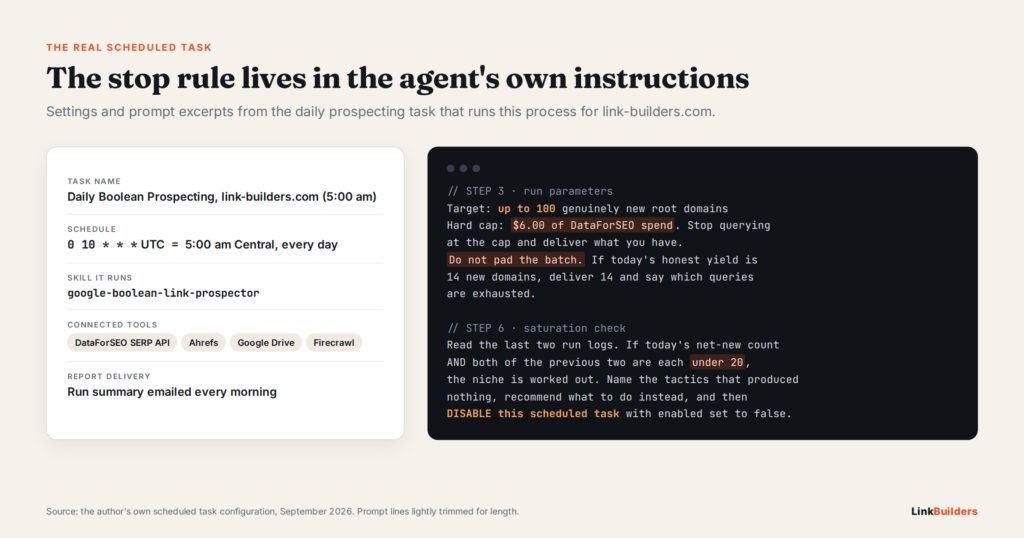
So my daily prospecting agent has a rule built into it. It runs at 5am. If it brings in fewer than 20 net-new qualified domains for three runs in a row, it emails me a report, names the searches that came up empty, suggests what to try next, and then turns off its own scheduled task. It doesn’t wait for me to notice.
This post covers why that rule exists, the guardrails that make it trustworthy, and how to add the same kind of stop to any agent you build, whether it finds link prospects or does something else entirely.
Output Is Not Value
There’s a quiet assumption behind most automation: if a task ran, it was worth running. With AI agents, that assumption gets expensive.
The task often terminates upon completion, but it’s also common to include stopping conditions (such as a maximum number of iterations) to maintain control.
— Erik S. and Barry Zhang · Anthropic Engineering · Anthropic: Building Effective Agents
Why Agents Default to Running Forever
A scheduler makes repetition free. Once a task is set to run every morning, nothing in the setup asks whether yesterday’s run paid off. The agent has no idea it’s repeating itself. It just follows the prompt, and the prompt usually says something like “find new prospects,” not “find new prospects if any are left.”
Language models make this worse. They’re trained to be helpful, and they tend to hand back what you asked for. Ask for 50 results and you’ll usually get something close to 50, even if only 12 of them are any good.
Diminishing Returns in SERP Mining
Link prospecting follows a natural curve. The first week of a new query set pulls the easy wins: the obvious resource pages, the active guest post pages, the roundups that link out every month. By the second or third week, most of what comes back is either a domain you already have or a site that fails your quality checks.
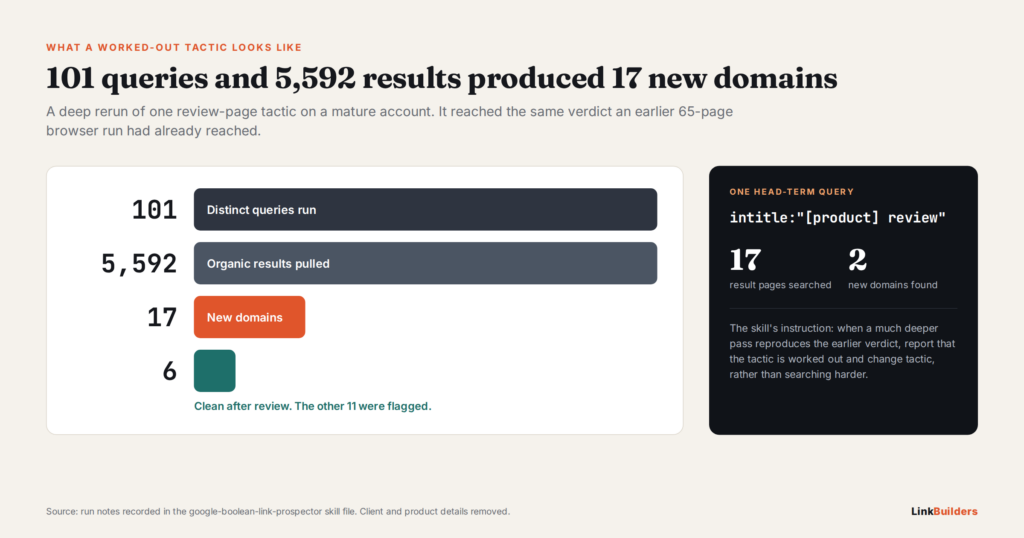
I saw this clearly when I dug into what 2,920 AI-surfaced link prospects actually look like. Volume and value split apart fast. More searches did not mean more good sites at the same rate.
What a Padded Batch Costs
A batch full of filler isn’t harmless. Someone has to review every row. If weak sites slip through, they end up in outreach, where they drag down reply rates and can hurt your sender reputation. Prospect quality has a big effect on results. When we contacted 6,657 prospects, response rates ranged from 5.4% to 27.6% depending on the campaign.
The worst cost is harder to see. A full sheet every morning hides the fact that the pipeline has gone dry. The daily report looks healthy right up until someone checks the results.
What a Stop Condition Means for AI Link Building Agents
A stop condition is a rule, checked in code, that ends or pauses an agent when the value it produces falls below a line you set ahead of time.
That sounds simple, but it’s different from the safety checks most people already build. Timeouts, max iteration counts, and error handling all stop an agent that is broken or stuck. A stop condition stops an agent that is working fine but has run out of useful work.
Anthropic’s guide to building effective agents recommends including stopping conditions, such as a maximum number of iterations, so you stay in control. That’s a good floor. For a scheduled agent that runs every day, though, you need to go further, because the risk isn’t one runaway session. It’s a hundred normal-looking sessions that each add a little less.
Three Kinds of Stops
I think about stops at three levels. Each one answers a different question, and each one covers a different window of time.
| Stop type | Scope | Question it answers | How my 5am agent handles it |
|---|---|---|---|
| Budget stop | One run | Have I spent too much today? | Hard $6 cap per run |
| Quality stop | One batch | Is this row real or filler? | Never pad a batch to reach 100 |
| Saturation stop | Across runs | Is this whole approach used up? | Under 20 net-new for three runs, then it disables itself |
Most agents have the first one at best. The third one is the one almost nobody builds, and over time it saves the most money.
In the 8-step link building pipeline I’ve mapped out for agents, prospecting is where a stop condition pays off most. Every step after it, from contact finding to outreach, depends on the list it produces. A bad list makes every later step slower and more expensive.
Anatomy of a Daily 5am Prospecting Agent
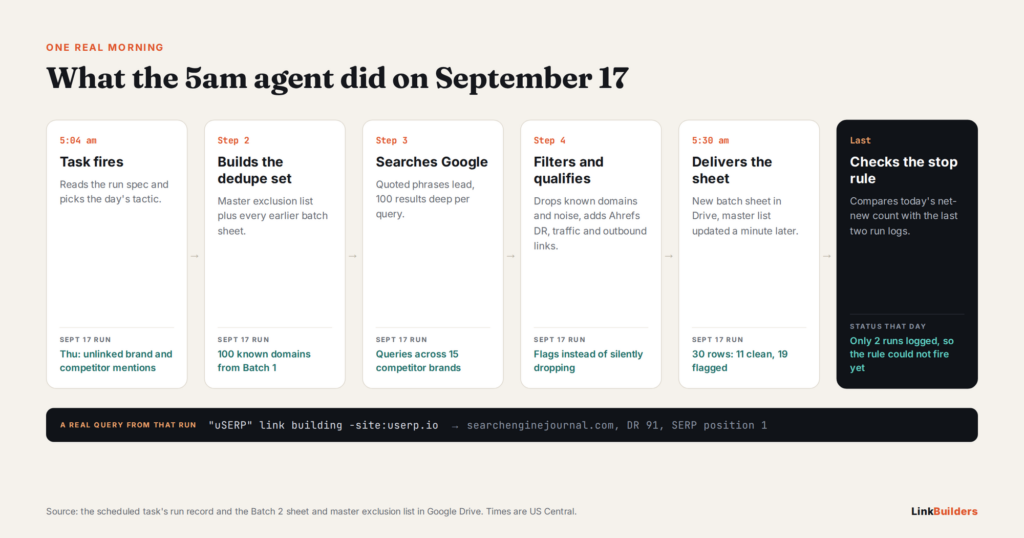
To make the stop rule concrete, it helps to see what the agent does on a normal morning. I’ve written up the full workflow behind my AI prospecting agent separately, so here I’ll stick to the parts that feed the stop rule.
The Job
Each morning the agent runs Google searches built from quoted phrases and advanced search operators. It looks for resource pages, write-for-us pages, roundups, and similar link targets in a client’s niche. It strips out domains we already know about, checks what’s left against our quality rules, and delivers a sheet I can review over coffee.
A Seven-Day Tactic Rotation
Each day of the week gets its own tactic, so no two mornings hit the same search results. One morning might focus on resource pages, the next on guest post pages, the next on roundups, and so on through the week.
The rotation spreads the work across different corners of Google’s index. It keeps any single query set from burning out in a few days. It also plays a big part in the saturation rule, which I’ll cover below.
Cheap Queries Lead, Expensive Queries Earn Their Spot
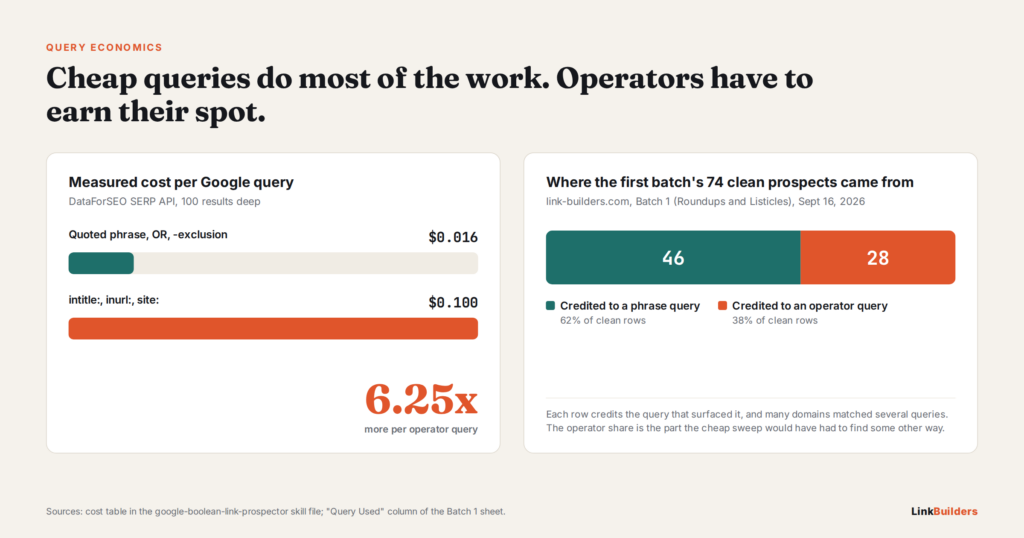
Not every search costs the same. In my setup, a quoted-phrase query costs about $0.016. A query stacked with operators like intitle: and inurl: costs about $0.10, roughly six times more.
So the cheap queries go first. Phrase queries run the full sweep. Operator queries only get budget where they’ve shown they reach sites the phrase queries can’t.
How “Proven” Gets Measured
After each run, the agent counts the qualified domains each operator query found that no phrase query found. If an operator query keeps turning up only sites the cheap queries already caught, it’s paying six times more for nothing, and it loses its spot. If it keeps finding sites nothing else reaches, it stays.
That decision comes from the data, not from my gut. It’s a small version of the same idea behind the whole post: let the numbers decide when something has stopped being worth the money.
The Guardrails That Make a Stop Rule Trustworthy
A stop rule reads a number and acts on it. If the number is wrong, the rule is wrong. These three guardrails keep the number honest.
A Hard $6 Cost Cap Per Run
Every run has a spending ceiling of $6. When the agent hits it, it stops searching, saves everything it has, and says plainly in the report that it hit the cap. It doesn’t borrow from tomorrow’s budget or keep going “just to finish the list.”
The cap also protects against bugs. A loop that goes wrong at 5am can burn through a lot of API credits before anyone is awake to see it. With a hard cap in place, I always know the worst case.
A Three-Source Dedupe, Compared in Code
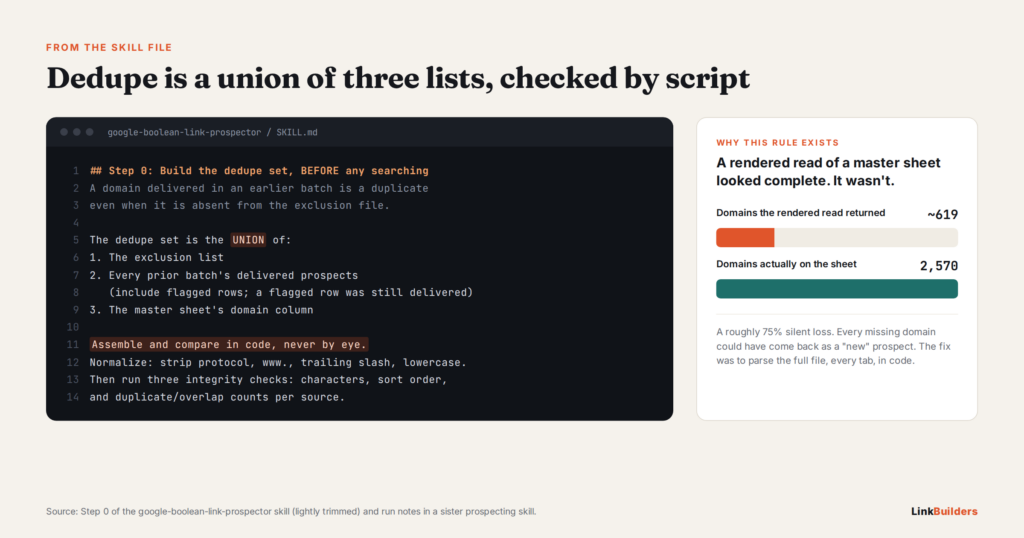
Before the agent counts a domain as new, it checks it against three lists: the master exclusion list, every batch sheet the agent has already delivered (flagged rows included), and any exclusion file supplied for that client. Those three lists get merged into one set, and every candidate is checked against that set by script.
Why code instead of a quick look? Because domains are messy. www.example.com, example.com, https://example.com/, and blog.example.com can all point to the same site. People miss those matches, especially on row 300 of a sheet. The agent strips each URL down to its root domain first, then compares. There are no judgment calls in that step.
This is one of the spots where agents tend to slip, and I cover more of them in what AI SEO agents still get wrong in link building.
What “Net-New Qualified” Means
A domain only counts toward the stop rule if it clears both hurdles. It has to be missing from the dedupe set, and it has to pass the quality checks.
Raw search results never feed the rule. If they did, the agent could see 400 results and think it had a great morning, when 390 of them were repeats or junk. The rule only works if it counts the thing you actually care about.
The Saturation Rule: When the Agent Switches Itself Off
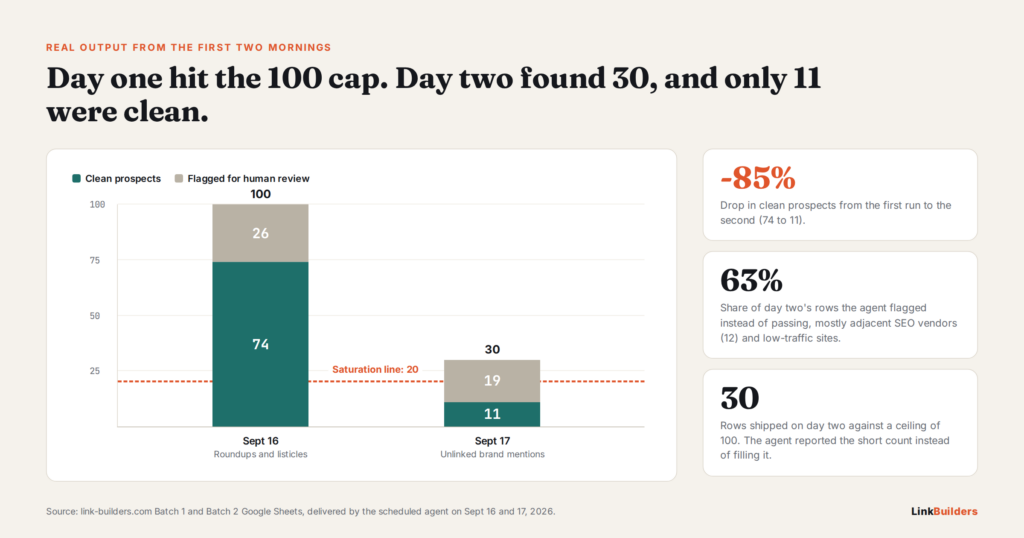
Here’s the rule in one sentence: if net-new qualified domains come in under 20 for three runs in a row, the agent shuts itself down.
Why Three Runs and Not One
One weak morning doesn’t mean much. A single tactic might be tapped out while the others still have room to run.
This is where the seven-day rotation earns its keep. Because each day runs a different tactic, three weak runs in a row means three different approaches came up short. That’s a pattern, not noise. It tells me the niche is close to saturated for the current search plan, not that one query set had a bad day.
Why 20
The number comes from cost. Every run costs money in queries, and every batch costs time to review and prepare for outreach. Below about 20 good sites, the run and the review cost more than the sites are worth to me.
Your line might be 10 or 50, depending on your costs, your margins, and how many links a campaign needs. The point is to pick a number on purpose, write it down, and let the agent enforce it. If you want to see how these numbers connect to agency pricing, I broke that down in the new unit economics of white-label link building.
What the Shutdown Email Says
When the rule trips, the agent sends me a short report with four parts:
- The net-new qualified counts for the last three runs.
- The query shapes that produced nothing, listed out.
- A recommendation for what to try next, such as new seed topics, a new geographic angle, or switching to a different source like a competitor’s backlink profile.
- Confirmation that it has disabled its own scheduled task, plus a note on how to turn it back on.
The template looks something like this:
Subject: Prospecting paused for [client]: saturation rule triggered

Last three runs: [X], [Y], [Z] net-new qualified domains (threshold: 20)
Queries with zero net-new results: [list]
Recommended next step: [recommendation]
Status: daily 5am task disabled. Re-enable it after updating the query plan.
Why Disable Instead of Just Sending an Alert
Alerts are easy to ignore. If the agent sent a warning and kept running, it would keep spending money every morning while the email sat unread in my inbox.
Turning itself off forces a decision. I either update the query plan and switch it back on, or I move that client to a different prospecting method. Restarting takes one click, so a false alarm costs almost nothing. An agent that never stops costs a little more every single day.
Do Not Pad the Batch to Reach 100
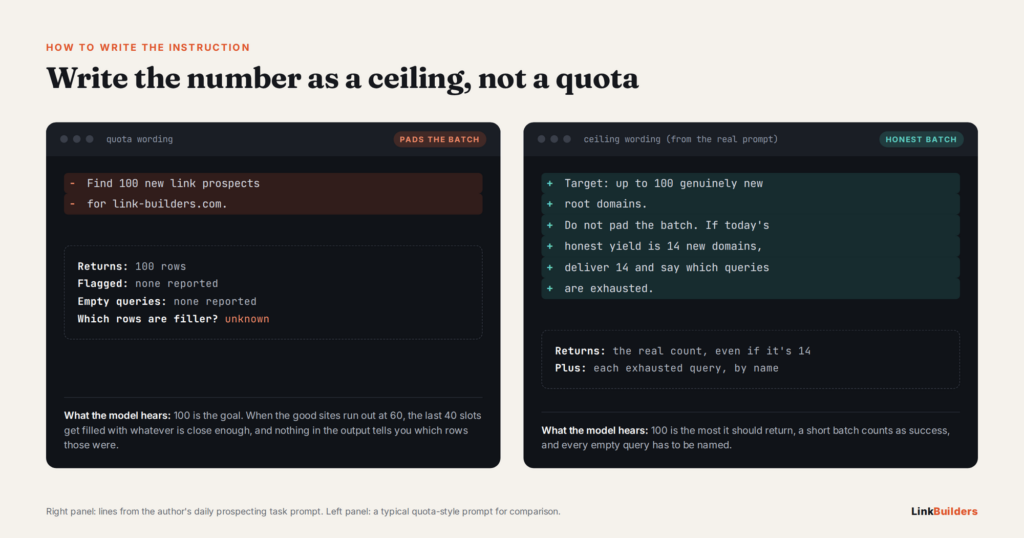
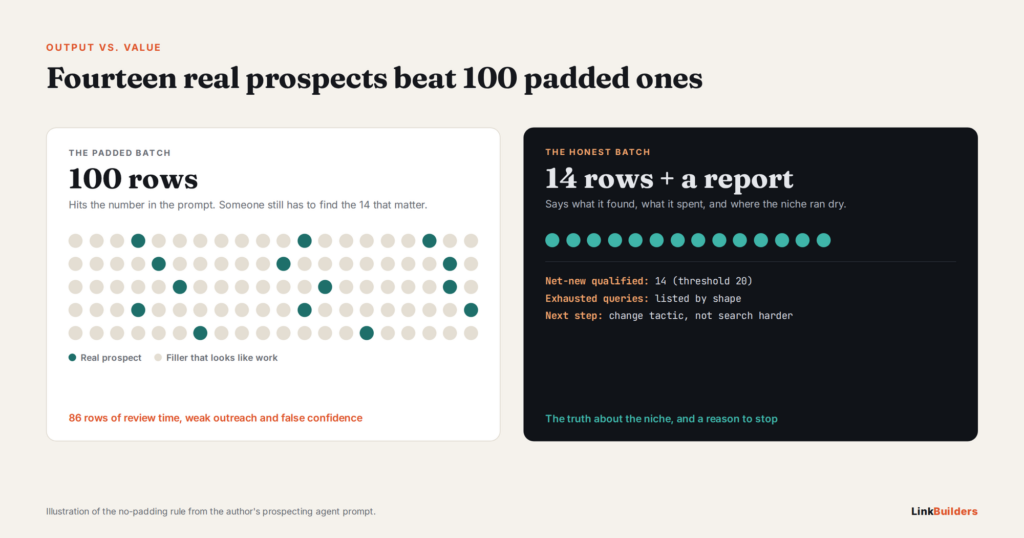
If I had to put one rule on the wall, it would be this one: do not pad a batch to reach 100. Reporting 14 real prospects and naming the exhausted queries is the correct output.
Why Agents Pad
When a prompt says “find 100 prospects,” the model reads that number as a target to hit. Language models lean toward pleasing the person asking. So when the good sites run out at 60, the last 40 slots get filled with whatever is close enough: borderline sites, off-topic blogs, pages nobody has touched in years.
None of it looks wrong at a glance. That’s exactly the problem. Filler that looks like real work is harder to catch than an obvious error.
How to Write the Instruction
Treat the number as a ceiling, not a quota. My prompt tells the agent that 100 is the most it should return, that a short and honest batch counts as a success, and that it must list every query that came up empty. Spell that out in plain words. Don’t count on the agent to figure it out.
This rule is one piece of a bigger quality system. Later in the pipeline, I use AI outreach QA gates for the same reason: to catch weak work before it goes out under my name.
What a Good Short Report Looks Like
A good short report has three things. It gives the real count of qualified sites. It lists the queries that returned nothing new. And it adds a note on where the next run should look.
That report is more useful than a padded list of 100, because it tells me the truth about where the niche stands. A list of 100 tells me the agent can count.
Stop Conditions Beyond Link Building
Nothing about this pattern is specific to SEO. Any agent that runs on a schedule and looks for new things will hit the same wall sooner or later. Standards like the Model Context Protocol make it easy to connect agents to live data and tools, so more people are building scheduled agents than ever. Most of those agents have no stop rule at all.
Here’s how the same idea carries over to other kinds of agents:
- Research agents can stop when new sources stop adding new facts.
- Lead generation agents can stop when new leads, after a dedupe against the CRM, fall below a set count.
- Monitoring agents can stop or slow down when nothing has changed for a set number of checks.
- Content refresh agents can stop when the pages left to update fall below a traffic threshold.
The logic is the same in every case. Define what a useful result is, count it honestly, and stop when the count says the work is done.
How to Add a Stop Condition to Your Own Agent
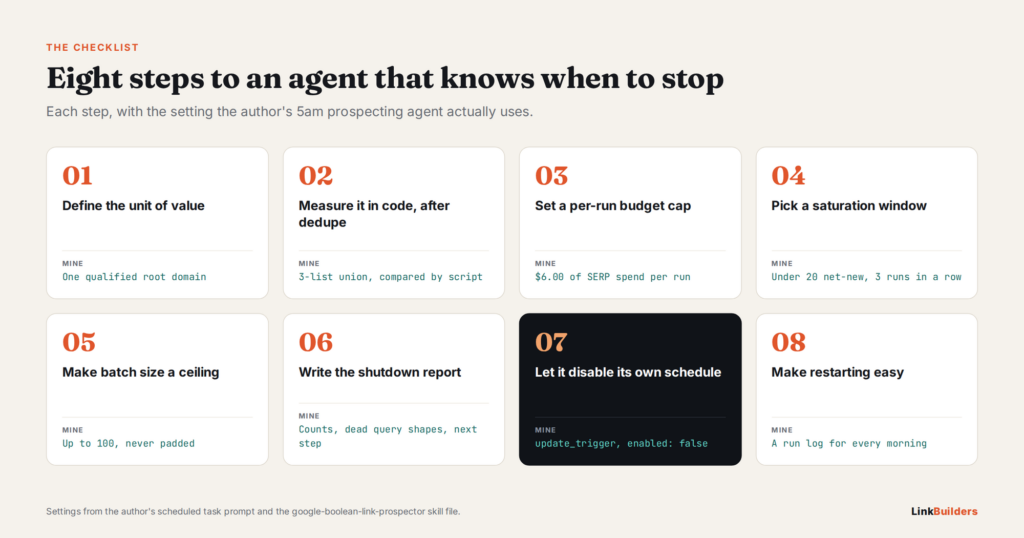
You don’t need a complex system to do this. Here’s the checklist I follow:
- Define the unit of value. Decide what one useful result is. For me it’s a qualified domain. For you it might be a verified lead or a new fact.
- Measure it in code, after dedupe. Never count raw output. Count what survives your filters.
- Set a per-run budget cap. Make the agent stop at the cap and say so in its report.
- Choose a saturation window and a threshold. Base both on your real costs, not a round number that sounds nice.
- Make batch size a ceiling. Tell the agent that a short, honest batch is a success.
- Write the shutdown report format. Include the numbers, the dead queries, and a recommendation.
- Let the agent disable its own schedule. Give it permission to turn off its task as the last step.
- Make restarting easy. Log why it stopped so you can fix the plan and switch it back on fast.
If you build with Claude, Agent Skills are a good place to write these rules down so every run follows them the same way.
Frequently Asked Questions
What is a stop condition in an AI agent?
It’s a rule, checked in code, that pauses or ends an agent when the value of its output drops below a set line. It differs from a timeout or an error handler because it stops an agent that is working, not one that is broken.
Won’t a self-disabling agent miss opportunities?
It might pause during a stretch when a few good sites would have turned up. But the shutdown report tells you exactly why it stopped, and restarting takes a click. You’re trading a small chance of missing a handful of sites for protection against months of wasted spend and filler.
How do I choose the right saturation threshold?
Start with your costs. Add up what one run costs in queries and what one batch costs in review time. Then figure out how many good results you need to make that worthwhile. That number is your threshold. Revisit it once you have a few weeks of data.
Can a scheduled AI agent really turn itself off?
Yes, as long as it has permission to change its own scheduled task. The agent disables the task as the final step of the run, right after it sends the report. If your platform doesn’t allow that, a simple fallback works too: have the agent save a “paused” flag and check for it at the start of every run.
The Best Agent Knows When to Quit
An agent that runs forever feels productive. The sheet fills up, the reports come in, and it looks like work is getting done. But output and value are not the same thing, and the gap between them grows every day the agent keeps running past the point of usefulness.
A stop condition closes that gap. It makes the agent honest about what it found, what it spent, and when the approach has run its course. Fourteen real prospects beat 100 padded ones every time.
Clean prospect lists also make every later step work better. Tactics like AI personalization layers in outreach and anchor diversity in AI-drafted link pitches only pay off when the sites on the list deserve the effort.
At Link Builders, we run this kind of agent-driven prospecting for our clients and as white-label fulfillment for agencies. If you’d like a pipeline that tells you the truth about your niche instead of padding the numbers, get in touch with our team.
About the author

Justin Davis has been building backlinks since 2015 and has built links for more than 150 clients across law, healthcare, real estate, software, and other industries. He built the first version after years of doing the research by hand, and now builds the same workflow for in-house teams. More on who Justin Davis is, on YouTube, on LinkedIn, or on X.