
How to Find 500 Link Prospects in 30 Minutes Using Google’s Hidden Search Operators

How to Find 500 Link Prospects in 30 Minutes Using Google’s Hidden Search Operators
I spent my first year in link building doing everything the hard way. I’d open Google, type in something like “health blogs guest post,” scroll through pages of results, and manually check each website to see if it was worth reaching out to. On a good day, I’d find maybe 50 decent prospects. It took hours.
Then I discovered Google’s search operators, and everything changed. These simple commands let me filter through millions of web pages in seconds and pull up exactly what I needed. What used to take me all morning now takes 30 minutes, and I walk away with 500 quality prospects instead of 50.
The best part is that any business owner can learn this. You don’t need expensive tools or technical skills. You just need to know the right commands to type into Google. Let me show you exactly how it works.
What Are Search Operators and Why Should You Care?
Search operators are special commands that tell Google to filter results in specific ways. Think of them like secret shortcuts that most people don’t know about.
For example, if you search for “mental health resources” without operators, Google gives you about 2 billion results. That’s useless. But if you search for intitle:"mental health" intitle:"resources" inurl:links, you get a few thousand highly relevant resource pages that might actually link to you. That’s the difference.
Here are the operators you need to know:
site: searches only within a specific website
intitle: finds pages with specific words in the title
inurl: finds pages with specific words in the URL
“quotes” forces Google to match your exact phrase
-minus excludes words you don’t want
OR searches for one term or another (must be capitalized)
filetype: finds specific document types like PDFs
intext: searches within the page content
One critical rule that trips people up is spacing. When you use an operator, don’t put a space after the colon. It’s site:example.com not site: example.com. That space will break your search.
The Link Building Formulas That Actually Work
This is where it gets practical. I’m going to give you the exact operator combinations I use every week. These formulas work for finding guest post opportunities, resource pages, competitor mentions, and more.
Finding Guest Post Opportunities
Most professional SEO link builders use this formula as their starting point:

"your niche" intitle:"write for us" OR intitle:"guest post" OR intitle:"contribute"Let’s say you run a real estate business in Texas. You’d search:
"real estate" intitle:"write for us" OR intitle:"guest post"This pulls up blogs actively looking for contributors. You can make it even better by excluding sites you don’t want:
"real estate" intitle:"write for us" -site:medium.com -site:linkedin.comThe minus signs filter out platforms that are usually too generic or low quality for serious link building.
Finding Resource Pages
Resource pages are gold for link building because they exist specifically to link out to helpful content. Here’s the formula:
"your niche" intitle:"resources" OR intitle:"useful links"You can take this further by targeting educational sites:
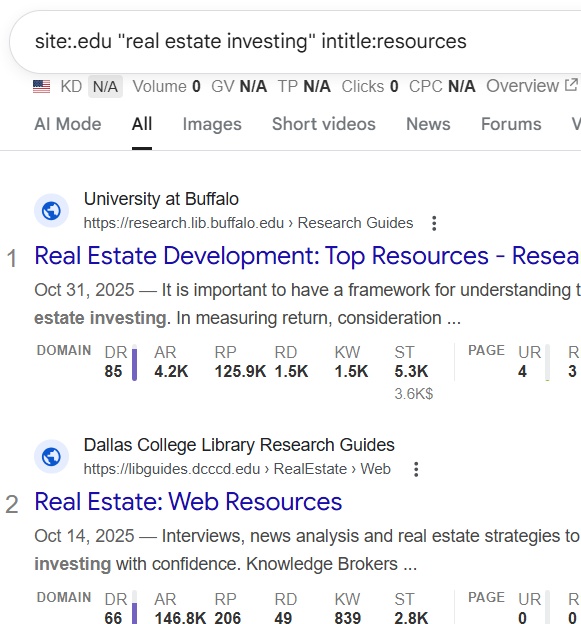
site:.edu "real estate investing" intitle:resourcesEducational and government domains often have high authority, and their resource pages can be easier to get on than you’d think.
Finding Competitor Mentions
Want to know who’s talking about your competitors? This search shows you:
"competitor name" -site:competitorwebsite.comFor example:
"Zillow" -site:zillow.comThis finds every mention of Zillow except on their own website. Many of these mentions are unlinked, which means you can reach out and suggest they link to your similar service instead.
Finding Industry Directories
Directories still matter, especially niche-specific ones. Find them with:
"your industry" + inurl:directory OR "submit site"This locates places where you can submit your business for a backlink. Not all directories are worth your time, but the industry-specific ones usually are.
Finding Recent Roundup Posts
Bloggers love creating roundup posts like “The Best SEO Tools of 2024” or “Top Real Estate Blogs to Follow.” Get on their radar with this search:
"your niche" intitle:"best of" OR intitle:"top" after:2024-01-01The after:2024-01-01 part is crucial because it shows you only recent posts. You want fresh content that’s still being updated and shared.
Finding Blogs in Your Niche
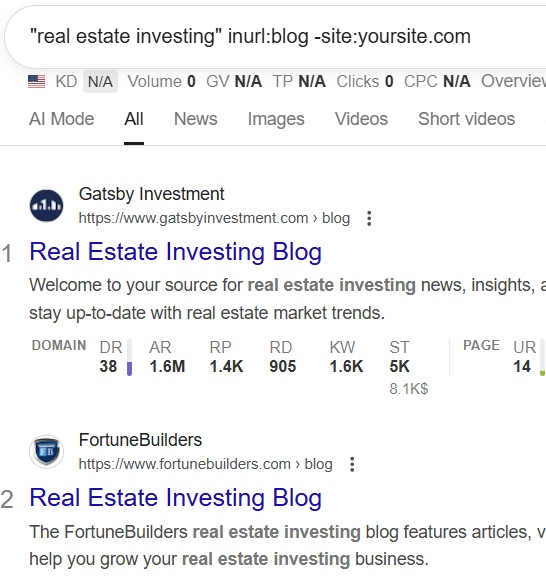
This formula helps you discover active blogs that cover your topic:
"your niche" inurl:blog -site:yoursite.comFor a cleaning business, you might search:
"home cleaning tips" inurl:blog -site:cleanmedellin.comYou can get more specific by looking for blogs that mention tools or resources:
"your niche" inurl:blog intitle:"tools" OR intitle:"resources"These blogs are more likely to link out because they’re already in the habit of recommending things to their readers.
Advanced Tricks for Better Results
Once you get comfortable with basic operators, you can stack them for incredibly specific searches.
Let’s say you want to find PDF guides about SEO that were published by educational institutions:
site:.edu filetype:pdf "search engine optimization"Or maybe you want to find partnership opportunities your competitor landed in the last six months:
site:competitor.com after:2023-06-01 intext:"partnership" OR "collaboration"The AROUND(X) operator is one most people don’t know about, but it’s powerful. It finds pages where two terms appear within X words of each other:
backlinks AROUND(3) outreach inurl:blogThis finds blog posts where “backlinks” and “outreach” appear close together, which usually means the content is directly relevant to what you’re doing.
My 30-Minute Prospecting System
Here’s how I actually use these operators when I sit down to build a prospect list.
Minutes 1-10: I run 8 to 10 different operator searches based on formulas like the ones above. I’m not reading results yet, just collecting them. I open each search in a new tab.
Minutes 11-20: I quickly scan through the results in each tab. I’m looking at page titles and URLs to see if they’re relevant. If a result looks good, I copy the URL into a spreadsheet. I can usually evaluate and copy 50 to 75 URLs in ten minutes.
Minutes 21-30: I do a final quality check on my list. I remove obvious junk, check that sites are still active, and add notes about why each prospect might be a good fit.
After 30 minutes, I have 400 to 500 prospects. Some weeks I get more, some weeks less, but it’s always way more than I’d find with regular searching.
The key is having your operator formulas ready before you start. Don’t waste time thinking about what to search for. Have a list of 10 to 15 proven formulas and just run through them.
Why I Eventually Stopped Doing This Manually
Here’s the truth that took me a while to accept. Even though I got fast at using Boolean operators, I was still spending 2 to 3 hours every week on prospecting. For one client, that’s fine. For ten clients, it’s manageable. For 150 clients, it’s impossible.
The other problem is that finding prospects is only step one. After prospecting, you still have to find contact emails, verify they work, write personalized outreach messages, send follow-ups, and track responses. That’s where the real time sink happens.
I realized I was spending 10 to 15 hours a week on tasks that felt productive but were actually just repetitive. I wasn’t doing strategy or building relationships. I was basically a human robot running the same searches over and over.
That’s when I started looking into AI-powered link building programs. These tools do exactly what I was doing with Boolean operators, except they run 24/7 without me. They search for prospects, score them based on quality metrics, find contact information, and even generate personalized outreach emails.
The difference in scale is dramatic. I was finding 500 prospects in 30 minutes. AI tools can analyze 10,000 prospects in the same time and tell me which 50 are most worth reaching out to. They never get tired, never make typos, and they learn which types of prospects actually convert into backlinks.
I still use Boolean operators when I need to do quick research or explore a new niche. They’re an essential skill. But for daily prospecting across multiple clients, automation was the only way to scale without hiring a team of people to do repetitive searches all day.
What to Look for in Link Building Automation
If you decide automation makes sense for your business, here’s what actually matters. The tool should be able to run custom Boolean searches based on your specific formulas. It should find and verify contact emails automatically. It needs to score prospects based on domain authority and relevance so you’re not wasting time on low-quality sites.
The best tools also generate personalized outreach messages that don’t sound like templates, track your campaigns, and handle follow-up emails. Integration with your existing systems matters too. You don’t want to manage five different platforms.
Start with Operators, Scale with Automation
You now have the same Boolean operator formulas I used to build lists for over 150 clients. These searches work. They’ll save you hours compared to manual prospecting, and they’ll find opportunities you’d never discover otherwise.
My advice is to spend the next week practicing with these operators. Get comfortable with the syntax. Figure out which formulas work best for your niche. Build yourself a list of 20 proven searches you can run whenever you need fresh prospects.
Once you’ve mastered the manual process and you understand what makes a good prospect, then consider automation. You’ll be in a much better position to evaluate tools because you’ll know exactly what they should be doing behind the scenes.
The goal isn’t to choose between Boolean operators and automation. The goal is to understand the fundamentals so well that when you do automate, you’re automating the right things.